How to find every AI config file on your Mac
~/.claude/, ~/.cursor/, ~/.codex/, ~16 more), Application Support (Claude Desktop, VS Code extension storage for Cline/Roo/Continue), and inside every project you've ever opened (CLAUDE.md, .cursor/rules/, AGENTS.md, .mcp.json…). A manual audit means checking all three layers for 19 tools. Or you open Desastre and it does the whole thing in seconds.
Layer 1: hidden dot-folders in your home directory
Run ls -d ~/.*/ | sort and you'll find more AI residue than you expect. The main global locations:
| Tool | Global config root |
|---|---|
| Claude Code | ~/.claude/ — plus ~/.claude.json outside the folder (details) |
| Cursor | ~/.cursor/ (details) |
| Windsurf | ~/.windsurf/ and ~/.codeium/windsurf/ — two roots (details) |
| Codex | ~/.codex/ — plus newer skills in ~/.agents/skills/ |
| GitHub Copilot CLI | ~/.copilot/ (details) |
| Gemini CLI + Antigravity | ~/.gemini/ — shared, with a conflict (details) |
| Aider | ~/.aider.conf.yml, ~/.aider.model.settings.yml |
| Amp / OpenCode | ~/.config/amp/, ~/.config/opencode/ (moves with $XDG_CONFIG_HOME) |
| Continue.dev | ~/.continue/ |
| Cline / Roo Code | ~/.cline-rules/, ~/.roo/ |
| Zed | ~/.config/zed/ |
| Augment / Hermes / OpenClaw / Pi | ~/.augment/, ~/.hermes/, ~/.openclaw/, ~/.pi/ |
Layer 2: Application Support
- Claude Desktop:
~/Library/Application Support/Claude/claude_desktop_config.json— where your Claude Desktop MCP servers live. - VS Code extensions (Cline, Roo Code, Continue):
~/Library/Application Support/Code/User/globalStorage/<publisher>.<extension>/— MCP settings buried where nobody looks.
Layer 3: inside every project
This is the layer a manual audit can't realistically cover. Each repo you've opened with an AI tool may contain any of: CLAUDE.md, AGENTS.md, GEMINI.md, .claude/, .cursor/rules/, .cursorrules, .windsurfrules, .github/copilot-instructions.md, .mcp.json, .clinerules, .roo/, .aider.conf.yml… multiplied by every project, experiment and one-off clone in your home folder. You could script it:
find ~ -name "CLAUDE.md" -o -name "AGENTS.md" -o -name ".cursorrules" \
  -o -name ".mcp.json" -o -name "GEMINI.md" 2>/dev/null
…but that command misses the folder-based indicators, wades through node_modules copies of other people's files, tells you nothing about what's inside each hit, and you'll never run it twice.
The one-click audit
Desastre is that audit as a native app. On launch it checks every known global path, then sweeps your home folder for all project-level indicators — skipping node_modules, .git, build caches and other noise — and shows the result as a Finder-style inventory:
- One row per skill, agent, rule, command and MCP server — with size, dates and the project it belongs to
- Filter by tool, kind, or global-vs-project scope
- Instant previews: rendered Markdown, syntax-highlighted JSON/TOML/YAML
- Reveal on disk, move stale configs to Trash, or copy the good ones to another tool
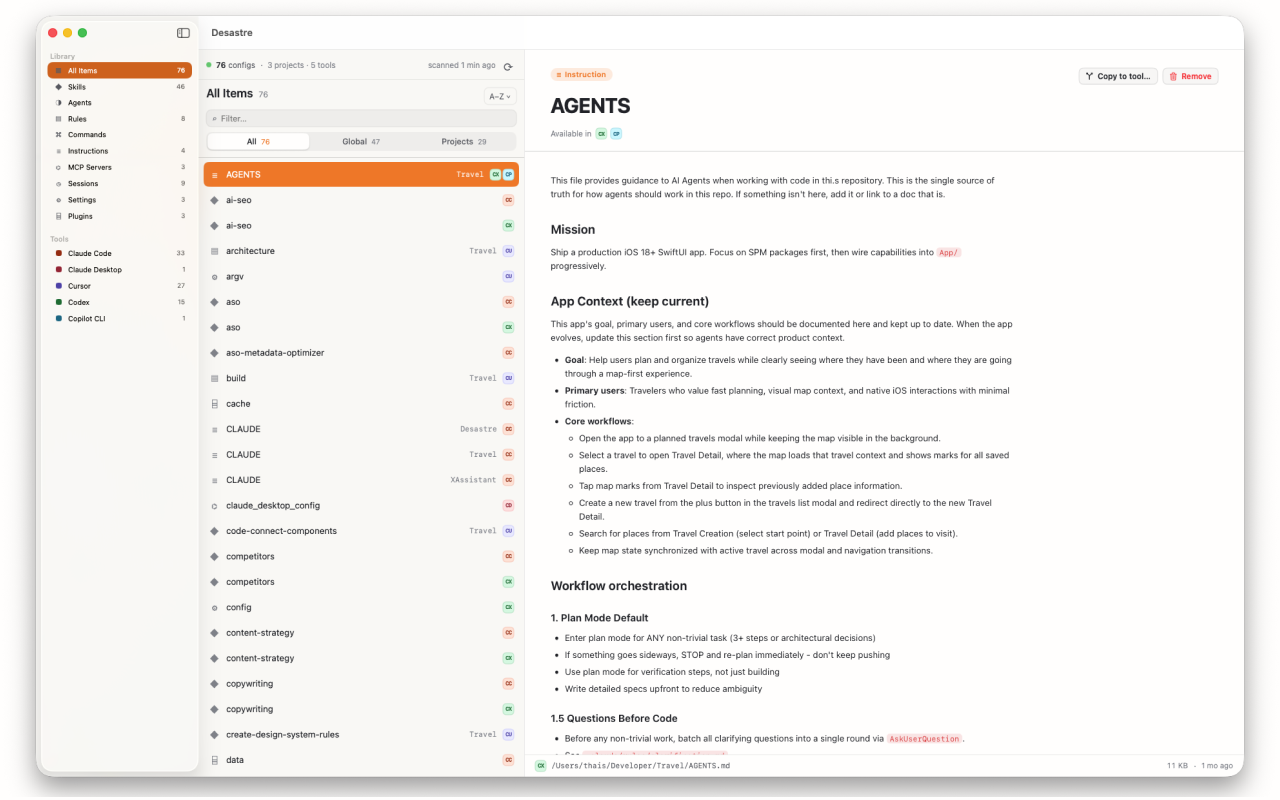
Everything happens locally — Desastre never uploads your files, needs no account, and asks for a single home-folder grant on first launch. The scan that would take you an afternoon takes it seconds, and rescanning is one click, so the inventory stays true as your tools keep writing.

Desastre — AI config manager for Mac
The complete AI config audit, automated. 19 tools, one window, $1.99 one time.
Download on the Mac App Store