Where does Claude Code store settings, skills and agents?
~/.claude/ — skills in ~/.claude/skills/, agents in ~/.claude/agents/, slash commands in ~/.claude/commands/, and instructions in ~/.claude/CLAUDE.md. MCP servers, however, live in ~/.claude.json — a separate file outside the .claude folder. Each project adds its own .claude/ folder and CLAUDE.md.
The complete Claude Code config map
Claude Code splits configuration between one global location (your home directory) and one per project. Here is every path it reads on macOS:
Global (applies to every project)
| What | Path | Format |
|---|---|---|
| Skills | ~/.claude/skills/ | One folder per skill with a SKILL.md manifest |
| Agents (subagents) | ~/.claude/agents/ | One .md file per agent, YAML frontmatter |
| Slash commands | ~/.claude/commands/ | One .md file per command |
| Instructions / memory | ~/.claude/CLAUDE.md | Plain Markdown |
| Settings | ~/.claude/settings.json | JSON |
| Plugins | ~/.claude/plugins/ | One folder per plugin |
| Session transcripts | ~/.claude/projects/ | One folder per project, JSONL transcripts |
| MCP servers | ~/.claude.json | JSON, servers under the mcpServers key |
Per project (inside each repo)
| What | Path |
|---|---|
| Project instructions | CLAUDE.md (repo root; CLAUDE.local.md for git-ignored personal notes) |
| Project skills | .claude/skills/ |
| Project agents | .claude/agents/ |
| Project commands | .claude/commands/ |
| Hooks | .claude/hooks/ |
| Project settings | .claude/settings.json and .claude/settings.local.json |
| Project MCP servers | .mcp.json (repo root) |
The gotcha: ~/.claude.json lives outside the folder
The single most common surprise: your global MCP server configuration is not in ~/.claude/. It sits next to it, in a hidden file called ~/.claude.json. If you've ever backed up or inspected the .claude folder and wondered why your MCP servers didn't come along — that's why. The file also accumulates per-project state, so it can grow surprisingly large.
How the layers combine
Claude Code merges settings from lowest to highest precedence: user ~/.claude/settings.json → project .claude/settings.json → project .claude/settings.local.json → CLI flags. Skills, agents and commands are additive: global ones are available everywhere, and project ones ride along with the repo. That's tidy in theory — in practice, after a few months you have skills in your home folder, skills in a dozen repos, and no memory of which is which.
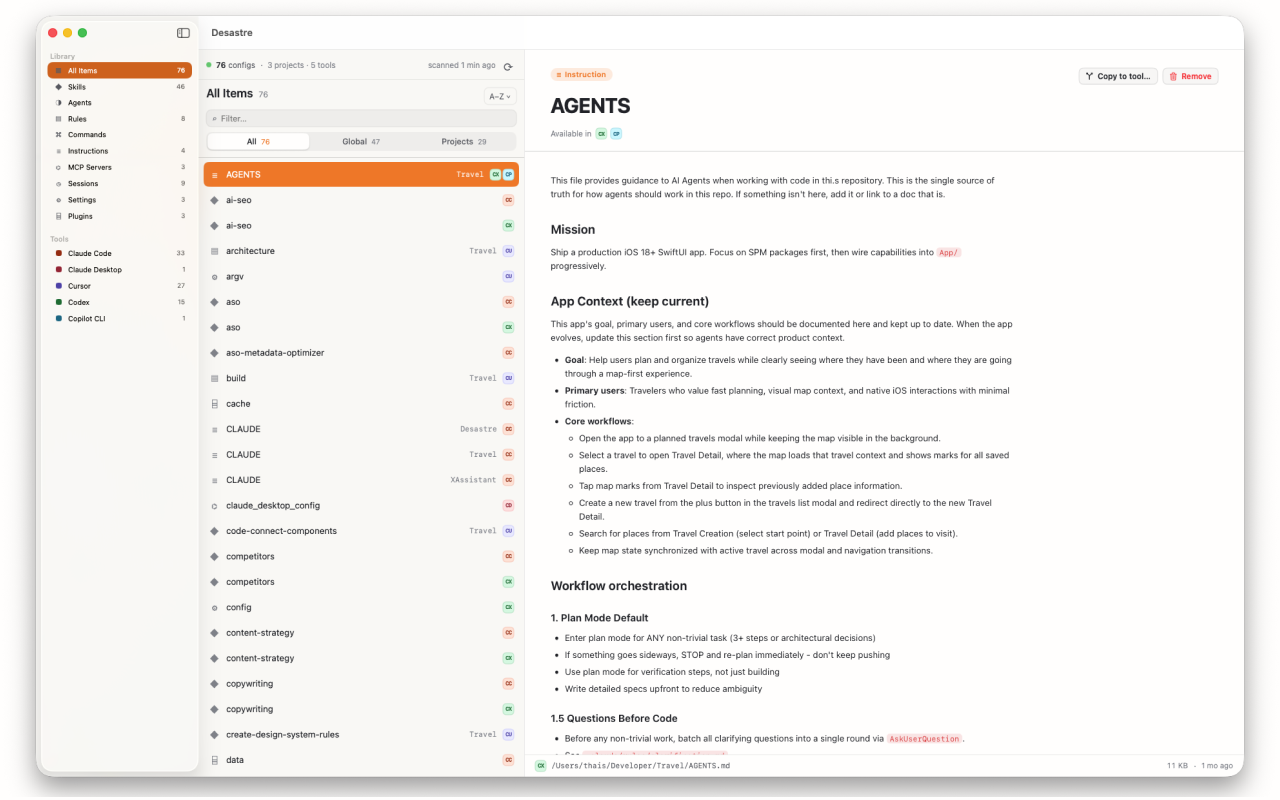
See all of it at once, instead of spelunking
You can ls -la ~/.claude/ and grep your way through every repo — or you can see the whole picture in one window. Desastre scans your machine and lists every Claude Code skill, agent, command, CLAUDE.md and MCP server it finds — global and per-project, including ~/.claude.json and configs in repos you forgot existed. Each item previews instantly with rendered Markdown, and one click reveals it on disk.
It also tags each file with every other tool that can read it — so when a skill in .agents/skills/ is visible to both Codex and Amp, you know before you edit it.

Desastre — AI config manager for Mac
Every Claude Code config on your machine, plus 18 other tools, in one native window. $1.99, one time.
Download on the Mac App Store