AI config scanner for Mac
CLAUDE.md, AGENTS.md and more from 19 tools — and lists every one in a single Finder-style window. The scan runs locally in seconds, never uploads a byte, and costs $1.99 once. "Scan" here means find and inventory your configuration, not scan for security vulnerabilities.
What the scan finds
AI coding tools scatter configuration across three layers your eyes never reach: hidden dot-folders (~/.claude/, ~/.cursor/, ~/.codex/ and ~16 more), Application Support (Claude Desktop, VS Code extension storage for Cline, Roo Code and Continue), and inside every project you've ever opened (.cursor/rules/, .mcp.json, GEMINI.md…). Desastre sweeps all three and returns one row per skill, agent, rule, slash command and MCP server.
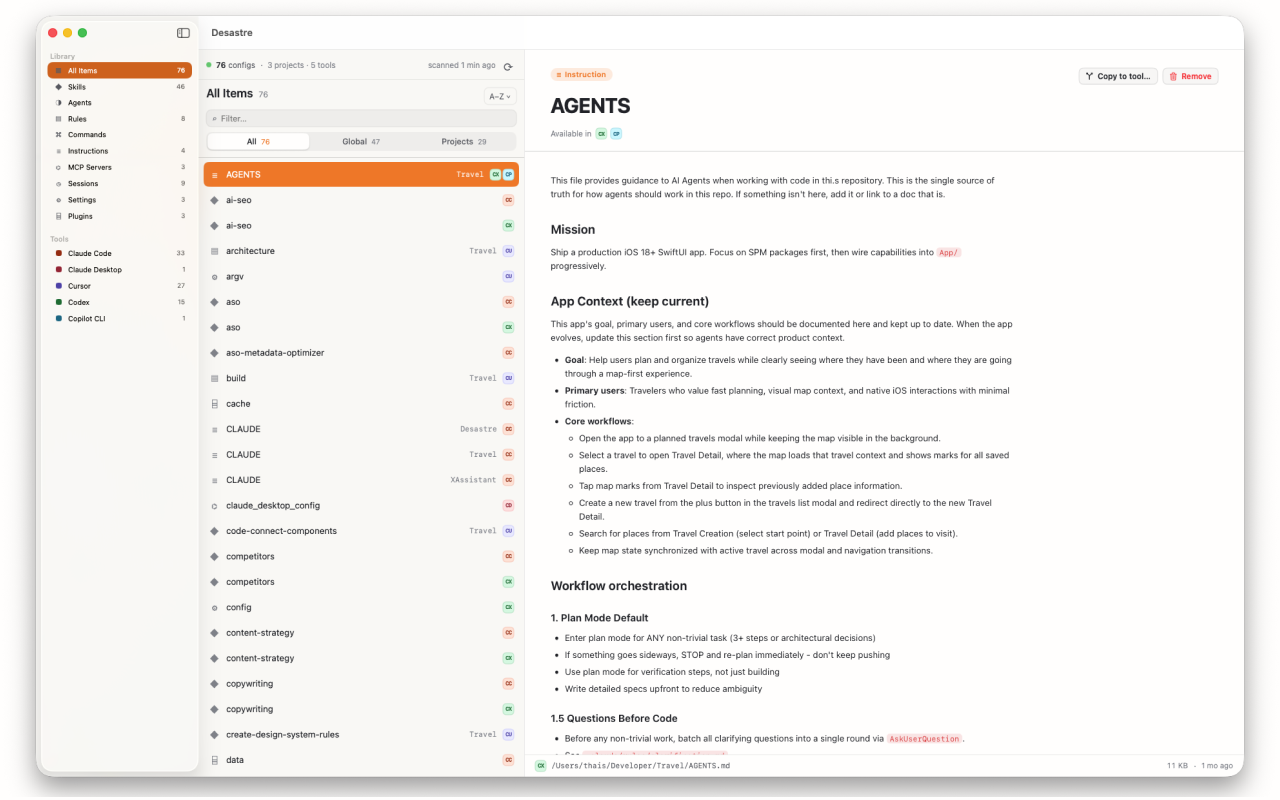
Every tool it scans for
19 tools in one pass: Claude Code, Claude Desktop, Cursor, Windsurf, Codex, GitHub Copilot, Aider, Amp, Antigravity, Gemini CLI, Augment Code, OpenCode, Continue.dev, Cline, Roo Code, Zed, Hermes, OpenClaw and Pi. Each file is tagged with every tool that can read it.
What you can do with the results
- Filter by tool, kind, or global-vs-project scope
- Preview instantly — rendered Markdown, syntax-highlighted JSON/TOML/YAML
- Reveal on disk, move stale configs to Trash, or copy a good config to another tool with automatic format conversion
- Rescan in one click so the inventory stays true as your tools keep writing
Private by design
Every scan happens on your Mac. Desastre is sandboxed and App Store-vetted, asks for a single home-folder grant on first launch, never uploads your files, and needs no account. Files over 2 MB are never loaded into memory.

Desastre — AI config scanner for Mac
Scan your Mac for every AI config file across 19 tools, in one window. $1.99 one time.
Download on the Mac App Store