AI config manager for Mac
Find
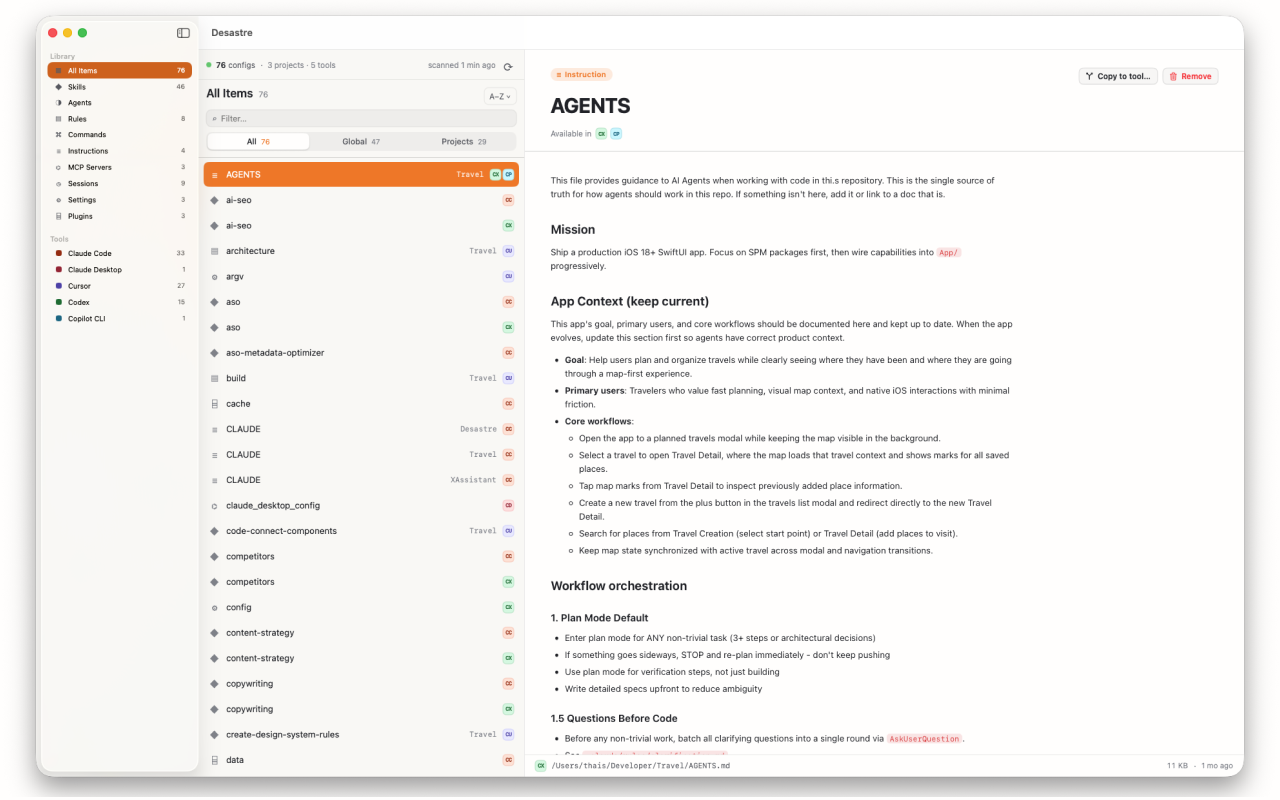
Desastre scans hidden dot-folders, Application Support, and every project you've opened, then shows one row per config with its size, dates, tool and project. No more guessing where Claude Code, Cursor or Codex hid a file.
Preview & clean up
Open any file inline — rendered Markdown, syntax-highlighted JSON, TOML and YAML — without hunting through the terminal. Move stale or duplicate configs to Trash to keep your setup lean.
Copy & convert between tools
Reuse a good config everywhere. Copy a set of Cursor rules to Claude Code, or a memory file to another tool, and Desastre converts the format automatically so the destination reads it correctly. See converting Cursor rules to Claude Code.
Every tool it manages
19 tools: Claude Code, Claude Desktop, Cursor, Windsurf, Codex, GitHub Copilot, Aider, Amp, Antigravity, Gemini CLI, Augment Code, OpenCode, Continue.dev, Cline, Roo Code, Zed, Hermes, OpenClaw and Pi.
Private by design
Everything happens on your Mac. Desastre is sandboxed and App Store-vetted, never uploads your files, and needs no account.

Desastre — AI config manager for Mac
Manage every AI tool's config across 19 tools, in one window. $1.99 one time.
Download on the Mac App Store